
04 / Platform
AKIZU Platform
Fleet, SIM cards and evidence in one place
Platform is a web application for the operator. It shows the fleet, SIM cards and flights. For every flight it stores an evidence package: what the operator saw, how old it was and which commands were issued.
StatusConcept and interface prototype
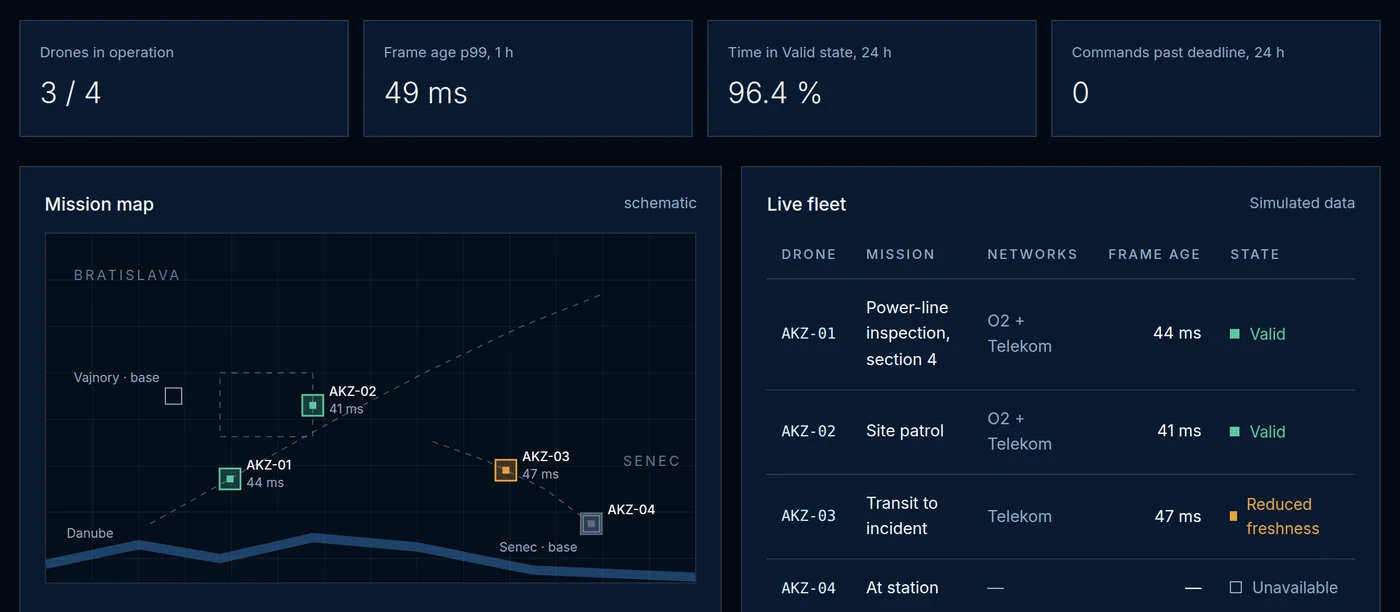
Overview
Overview and fleet
State of drones, missions and networks. Image age and time in the Valid state for each drone.
Flights and evidence
Flight timeline with image states and commands. Export of the evidence package for audit.
Verify
Results of optical image-age measurement on the customer drone, with measurement uncertainty.
Evidence package
From flight to audit material.
The black box in Brain records the age and state of every frame and the commands. Platform verifies the record, links it to the flight and prepares a package that can be presented to a third party.
- FlightBrain records
- Black boxage, state, commands
- Signaturerecord integrity
- Platformevidence package
- Exportfor audit and SORA
Proposed flow.
Flight timeline · Simulation
Every second of flight has a state.
This is how the timeline in the evidence package will look: image age per second, a state strip and flight events. Click an event or move across the chart.
The interactive chart requires JavaScript.
Why evidence
Regulation wants to know the loop latency.
The SORA risk assessment requires knowing the command-and-control latency and warning the pilot when the link degrades. Platform turns this into a record with numbers for every flight, not a one-off manufacturer claim.
Simulated data
Twenty-six demo modules
Overview
Schematic mission map, live frame-age chart and simulated outage of one or both networks.
Open →Fleet
Drones, Brain units, software and battery. Live drone detail with the signal of both operators.
Open →SIM cards
Data over 30 days by operator and the RSRP signal of each card over the last 24 hours.
Open →Alerts
Freshness and validity thresholds with instant recalculation of alerts on simulated flights.
Open →Evidence
Flight replay, SHA-256 fingerprint verified in the browser and frame-age distribution.
Open →Live view
Direct cockpit with the age of every frame, a neutral screen in outages and commands the drone will not execute past the deadline.
Open →Mission planning
Route by clicking on the map, estimated image age per segment, pre-flight check and plan export.
Open →Network coverage
Simulated signal map at 30, 60 and 120 m for O2, Telekom and both networks at once.
Open →Reports
Operations report, evidence for the authority and customer summary with preview, HTML, PDF and CSV.
Open →Devices and OTA
Brain units, clock offset and an update that never starts on a drone in flight.
Open →API and webhooks
API keys, a test event with HMAC signature and the proposed VERA frame header.
Open →Task dispatch
Flight requests with a deadline and a drone recommendation by arrival, battery and coverage.
Open →Compare flights
Two flights side by side: cumulative frame-age distribution and metric differences.
Open →AKIZU Platform
Specifications
Access
- Interface
- web browser N
- Users
- operator, pilot and auditor roles P
- Sign-in
- accounts for pilot partners, SSO in preparation P
- Integration
- API for your own systems P
Data
- Record
- signed, verifiable N
- Storage
- EU data centres C
- Export
- package for audit and SORA assessment P
- Video
- recording retention at customer choice P
Flight metrics
- Image age
- p50, p99, maximum N
- States
- time in Valid, Reduced freshness, Unavailable N
- Commands
- loop age, rejected past deadline N
Status
- Development
- concept and interface prototype P
- Deployment
- with the first fleets in 2028 P
To verify before production
- Feature scope with the first customers
- Evidence package format with an auditor
- Data location and retention period
- Link to the operator SORA assessment
Data labels
- Zmeasured internally
- Mmanufacturer data, not verified by AKIZU
- NAKIZU design
- Ctarget
- Pplan
- Odesign estimate
- Unot yet known
All numbers in the platform demo are simulated. Feature scope will be refined with the first customers.
In more detail
The demo is not an operation
Twenty-six modules are a demonstration. It sends nothing.
While the tab is open it remembers a flag in sessionStorage. After the tab closes there is no account, no fleet and no flight record.
The numbers in the demo are simulated. They do not carry a Z mark. They should not be cited as a measurement.
A live platform for pilot partners is not a public login yet. The login button says we do not issue accounts to everyone yet.
Bring to the meeting
- A pack tied to a flight, not to a day.
- Which drone was airborne.
- What the operator saw in that minute.
This is not
- An export to a server from the demo.
- A fleet shared between visitors.
- Evidence from simulated numbers.
Explore
Explore every area and the other sections
Twelve solution areas and the sections that belong with them. The case studies are illustrations, not completed deployments.
Solutions
Other sections
Book a demo
See how old your image really is.
We will show the system live or measure the image age on your drone.